Salesforce CRM Training Options for Teams
Unlock higher Salesforce adoption rates with training matched to how your team actually learns.
Getting Salesforce to work isn't really a Salesforce problem. It's a people problem. And the fix isn't buying more licenses or unlocking more features. It's training. But not just any training. The right training, matched to how your team actually learns and works.
Here's the uncomfortable truth: 42% of businesses say lack of training or CRM expertise is their biggest barrier to successful CRM implementation (CRM.org, 2026). Poor user adoption accounts for roughly half of all CRM failures. Not bad software. Under-prepared people. And fewer than 37% of sales reps actively engage with their company's CRM system, per CSO Insights. Meanwhile, employees typically use only about half of the available CRM functionality. The rest just sits there. Expensive shelfware.
The problem isn't Salesforce's feature set. The problem is that training gets treated like a one-time event. You do it at launch, check the box, and move on. Then adoption quietly erodes. This article maps every major training format available for Salesforce teams so you can build a plan that actually sticks.
What's Actually at Stake When Adoption Works
Let's start with the payoff, because it's worth stating clearly. Businesses that maximize Salesforce report a 314% ROI. Supporting that: a 29% increase in sales revenue, a 34% improvement in sales productivity, and a 42% increase in forecast accuracy have all been attributed to effective CRM use (Nutshell, 2025). Those are not incremental gains. Those are business-changing numbers.
So what does "good adoption" actually look like in practice?
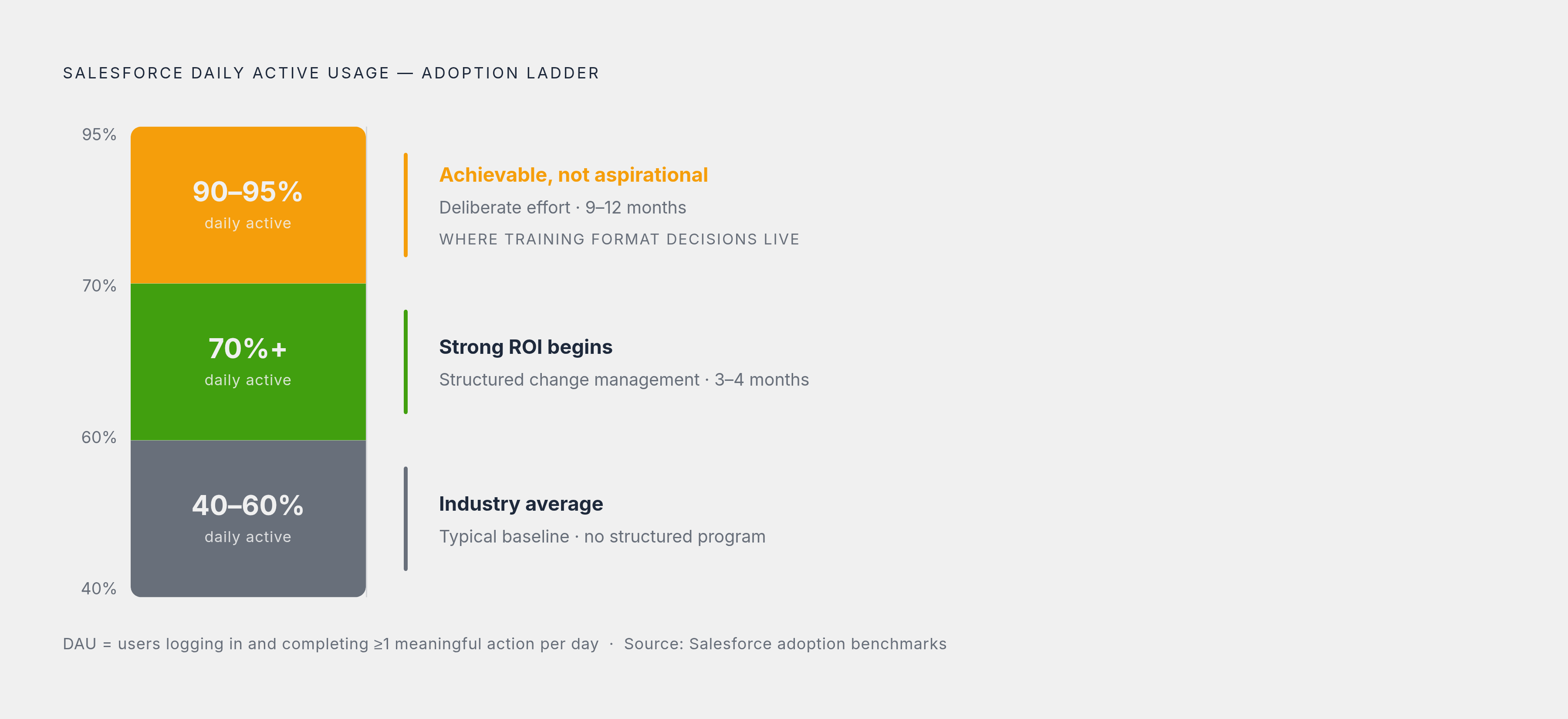
- 40–60% daily active usage is the industry average
- 70%+ daily active usage is where strong ROI starts showing up
- 90–95% is achievable. Not aspirational. Achievable, with deliberate effort
- A phased rollout with structured change management typically reaches 70% within 3–4 months, and 90%+ within 9–12 months
The gap between average and achievable adoption is where training format decisions actually live. That's the gap this article is about.
One more number before we move on: plan to spend 15–25% of your total CRM project budget on change management, training, and adoption support (Peergenics, 2024–2025). If that number surprises you, it means you've been underinvesting. Most teams have.
How to Think About Matching a Training Format to Your Team Before Choosing Anything
No single format works for every team. Full stop. The right choice depends on at least four variables:
- Team size and geographic distribution. A co-located sales floor in one office has different needs than a distributed team across six time zones.
- Role diversity. Admins, developers, sales reps, marketers, and executives each need different depth. One training program rarely serves all of them well.
- Urgency and timeline. A certification sprint before a major go-live is a completely different problem than gradual onboarding over six months.
- Budget and internal L&D capacity. If you have a dedicated learning and development team, you can build something sophisticated. If you don't, you need formats that run themselves.
A Whatfix survey found that 35% of salespeople believe they need more comprehensive training to use their CRM effectively. That's the gap being felt by reps, not just managers looking at dashboards.
Two mistakes show up constantly. The first is defaulting to whatever's cheapest or fastest, regardless of whether it matches how the team learns. The second is doing one training event at go-live and then doing nothing again. Salesforce releases quarterly updates. Your org changes. Your team turns over. Training can't be a single moment in time.
Before picking a format, a team lead should be able to answer three practical questions:
- Do we need baseline literacy across everyone, or deep expertise in a few people?
- Do we have time for structured cohorts, or do people need to learn in the flow of daily work?
- Is our Salesforce org heavily customized, or close to out-of-the-box?
Those three questions map directly onto the formats covered next. Think of what follows not as a catalog. Think of it as a set of answers.
Trailhead as the Baseline Layer: What It Covers and Where It Stops
Trailhead is free. Gamified. Completely self-paced. There is no barrier to entry for any team of any size. Since launching in 2014, it has taught more than 19 million people (SF Dictionary, May 2026). That's not a small experiment. That's infrastructure.
The structure is worth understanding clearly:
- Trails are guided learning paths that string together modules and projects around a specific topic or role
- Modules are self-contained units. Learnable in 20 minutes or two hours, depending on the topic
- Superbadges and credentials are verifiable, resume-relevant proof that someone actually did the work
Coverage spans every role and level: admin, developer, marketer, executive. Salesforce has also rapidly expanded AI and Agentforce content. Since June 2023, learners have earned more than 2.6 million AI and data badges on Trailhead. That number tells you how fast this content is being consumed.
For teams specifically, Trailhead supports custom Trailmixes. These are curated learning paths you build and share only with your staff, scoped to how your org actually uses Salesforce. A sales team that only uses Leads, Opportunities, and Reports doesn't need to wade through Service Cloud modules. You can build a path that matches exactly what they do. Field sales teams get access via the Trailhead GO mobile app on iOS and Android.
Now for the honest limitation. Trailhead builds conceptual fluency and feature familiarity very well. It is not a substitute for hands-on experience in a live org, especially for anyone building toward a technical Salesforce career. Knowing what a workflow rule is and knowing how to build one in your specific environment are two different things.
Best fit: Onboarding new reps to baseline literacy. Keeping existing users current across quarterly releases. Supplementing other training types. Not replacing them.
myTrailhead for Organizations That Need Training Shaped Around Their Own Processes
Trailhead teaches Salesforce. myTrailhead teaches your Salesforce. That's the distinction.
myTrailhead lets companies build branded, gamified learning paths using their own content. Videos, presentations, internal documentation, process guides. All of it layered on top of the Trailhead infrastructure so it still feels familiar to learners.
The capabilities worth highlighting:
- In-app learning recommendations triggered by events inside Sales Cloud, Service Cloud, or Marketing Cloud. If a rep struggles with lead conversion, a relevant learning path surfaces in the moment.
- Automated onboarding. New hires receive a role-specific learning path from day one. Learning starts structured, not ad hoc.
- Manager visibility into skill gaps and completion rates across the org. Training becomes measurable. That matters for executive sponsors who need to show adoption is moving.
Early enterprise adopters like Accenture and Telstra cited myTrailhead as a tool for enabling scalable, role-based learning across large distributed teams.
On pricing: myTrailhead was priced as an add-on to Enterprise Edition licenses, and you should confirm current pricing directly with Salesforce before building it into a budget. The number has likely shifted since the last published figures.
Best fit: Mid-to-large organizations with customized Salesforce orgs, dedicated L&D resources, and enough internal content to justify building a branded environment. For a small team running a mostly out-of-the-box org, the overhead probably isn't worth it. Trailmixes inside standard Trailhead will cover most of what you need.
Instructor-Led Training Through Trailhead Academy and When Live Instruction Earns Its Cost
Trailhead Academy is Salesforce's official training arm. In-person and virtual classes, private workshops, available in 13 languages, covering every Salesforce cloud, role, and level.
The format range is wide:
- One-day deep dives to multi-day workshops typically run $1,000–$2,000 per learner (SF Dictionary, May 2026)
- Private bootcamps for cohort certification run $3,000–$6,000 per learner and are often bundled with exam vouchers, retake vouchers, and in some formats, job-placement guarantees
That's real money. So it's fair to ask what live instruction actually provides that a self-paced module can't.
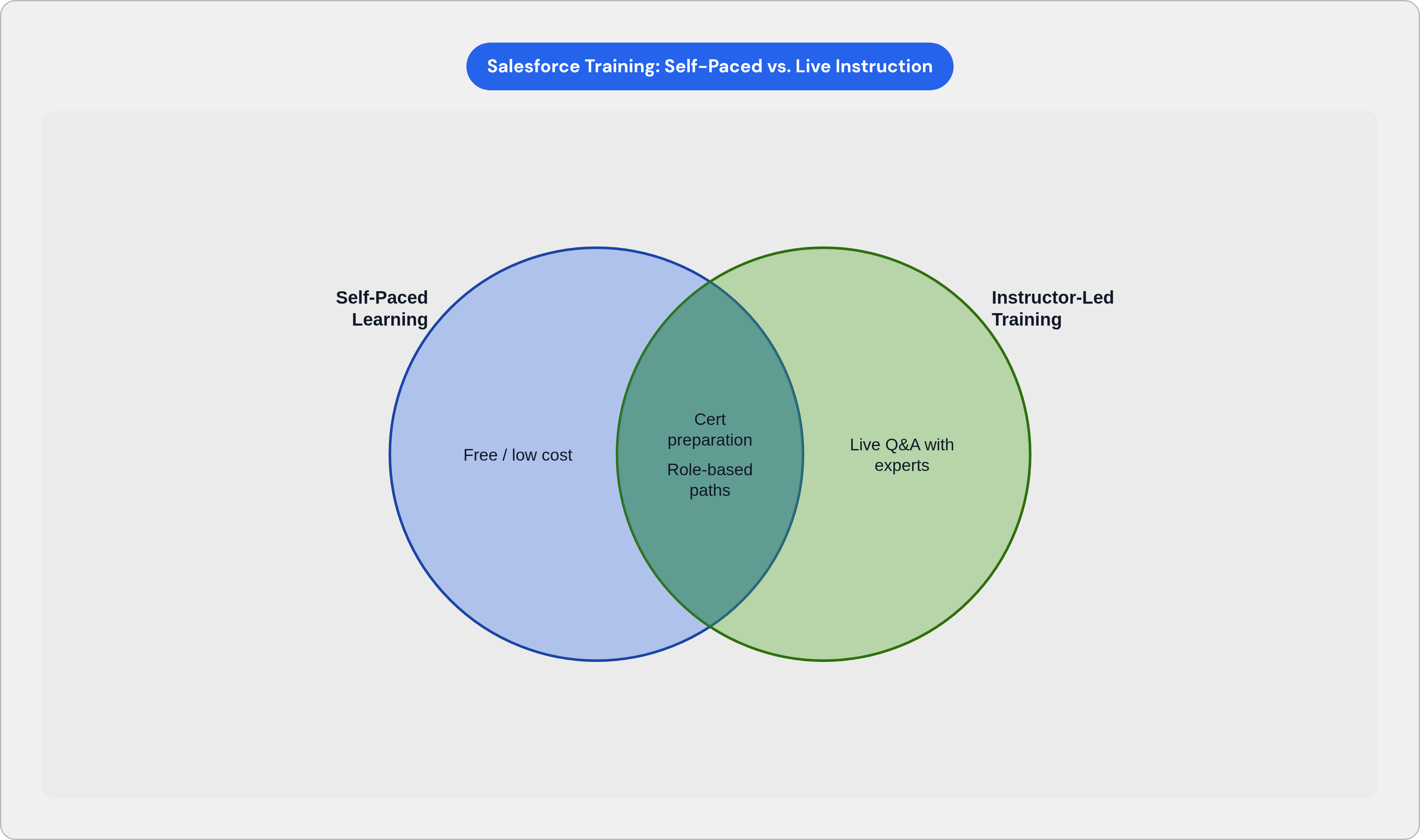
A few things: real-world scenario walkthroughs that go beyond sandbox exercises. Live Q&A with practitioners who've actually built these implementations. Cohort accountability, which is underrated as a forcing function. And immediate feedback on hands-on exercises, where you find out your approach was wrong while a real human can explain why.
A Salesforce-commissioned IDC report found that companies with skilled and certified employees were measurably more agile, more efficient, and saw greater employee impact. That's the business case for the investment.
Salesforce has also hosted Certification Days: free live events covering specific exam content. As of this writing, Salesforce paused scheduling further events after 2024, so confirm availability before including it in any plan.
Best fit: Teams on an aggressive certification timeline. Organizations rolling out a major new Salesforce cloud. Scenarios where a cohort learning and certifying together drives real accountability.
When it's overkill: When you need broad baseline familiarity across a large rep population. The per-learner cost is not sustainable at scale without pairing it with self-paced options for the majority.
Third-Party Training Providers and the Cases Where They Outperform Official Channels
Official Salesforce training is excellent at teaching Salesforce. Third-party providers are often better at teaching your industry's version of Salesforce. That's a meaningful distinction.
Third-party self-paced platforms like Udemy and Focus on Force run $15–$200 per course. Substantially cheaper than official instructor-led training. Useful for individuals prepping for a specific certification exam. Not designed for broad team onboarding.
Corporate training providers like TrainingFolks, Certstaffix, and SalesforceTraining.com operate differently:
- They deliver customized programs at the client's location or via private virtual sessions
- They cover industry verticals: IT, healthcare, finance, manufacturing, retail
- Volume discounts and Training as a Service arrangements are available through providers like Stony Point, relevant for organizations running training in waves across large teams
One specialist case worth naming explicitly: organizations in the nonprofit or cooperative sector should know that providers like Beth Saunders Associates focus specifically on those use cases. The data models and workflows in nonprofit Salesforce implementations differ substantially from for-profit ones. Generic training often misses that entirely.
Enterprise consultant training costs vary widely depending on scope, and in many cases get bundled into overall implementation contracts. Budget accordingly.
The honest trade-off: third-party providers may not stay as current with Salesforce's quarterly release cycle as official Trailhead content. Confirm content freshness before committing to a course or a provider. Ask directly when the content was last updated and what their process is for keeping pace with releases.
In-App Guidance and Digital Adoption Platforms for Teams That Need Training in the Flow of Work
Here's the core problem with any structured training event: it happens before the work, not during it. People learn something on Monday. By Thursday they're back in the system, stuck on a step they half-remember, and they either ask a colleague or skip it entirely. Multiply that by a team of 50 reps and a Salesforce release every quarter.
Tools like Whatfix solve a different problem. They embed contextual guidance, walkthroughs, and self-help directly inside the Salesforce interface. Help appears at the exact moment a user needs it. Not in a separate learning management system they'd have to open in another tab. Right there in the platform.
Gartner reports that organizations with strong Salesforce user enablement strategies see up to a 30% improvement in forecast accuracy and a 25% boost in sales productivity. That's in-app enablement doing work that no amount of pre-launch training can sustain on its own.
What in-app guidance solves that other formats simply don't:
- The forgetting curve. Formal training fades fast. In-app reinforcement catches people when the knowledge actually needs to surface.
- Infrequent tasks. Reps don't do every task often enough to memorize it. A guided walkthrough at the moment of action is more useful than a module they completed six months ago.
- Post-release consistency. Salesforce releases updates every quarter. You cannot retrain the whole team every 90 days. In-app guidance adapts without requiring a new training event.
Salesforce also has a native in-app guidance builder that lets admins create custom prompts and walkthroughs directly in the platform. For simpler use cases, this covers a lot of ground at a lower cost than a full third-party digital adoption platform.
Best fit: Teams past initial onboarding who need to close the gap between knowing the system and actually using it daily. Also the most practical layer for organizations with high rep turnover.
Limitation: In-app tools reinforce existing workflows. They don't teach foundational concepts. They work best layered on top of a structured onboarding track, not instead of one.
Salesforce Certification Tracks and How Teams Should Use Them as a Training Anchor
Certifications do something that self-paced learning alone cannot: they create a concrete, dated deadline that focuses preparation. There's an exam. You pass or you don't. That accountability changes how seriously people take the training leading up to it.
The five core certification tracks:
- Administrator. The baseline for anyone managing the org or serving as a power user.
- Developer. For anyone building custom solutions, integrations, or automation.
- Architect. For senior technical roles designing system strategy at scale.
- Consultant. For people implementing Salesforce solutions for clients or internal stakeholders.
- Marketer/Specialist. For roles owning specific clouds or functions like Marketing Cloud or Commerce Cloud.
Cost planning for teams:
- Associate-level exams: $75 per attempt. An accessible entry point for broad populations.
- Core certifications: $200–$600 per attempt, depending on level
- Technical Architect: approximately $6,000. Relevant for specialist hires, not broad teams.
- Retake fees: 50% of the original exam price. Worth factoring into budget from the start.
AI certifications were offered free through December 31, 2025. Confirm current status directly with Salesforce before including that in any budget or timeline.
How to actually use certifications as a training anchor:
- Set Administrator certification as a baseline requirement for Salesforce admins and designated power users
- Assign role-specific certifications (Sales Cloud Consultant, Marketing Cloud Email Specialist) to team members who own those functions
- For teams building toward AI agent use, Agentblazer status on Trailhead provides a structured progression from Champion to Legend levels
The pairing matters. A certification goal without the right training format to support it is just stress. Self-paced Trailhead works for flexible schedules. Trailhead Academy or a bootcamp works for compressed timelines. Match the prep format to the deadline.
Building a Training Plan That Combines Formats Across the Team's Roles and Timeline
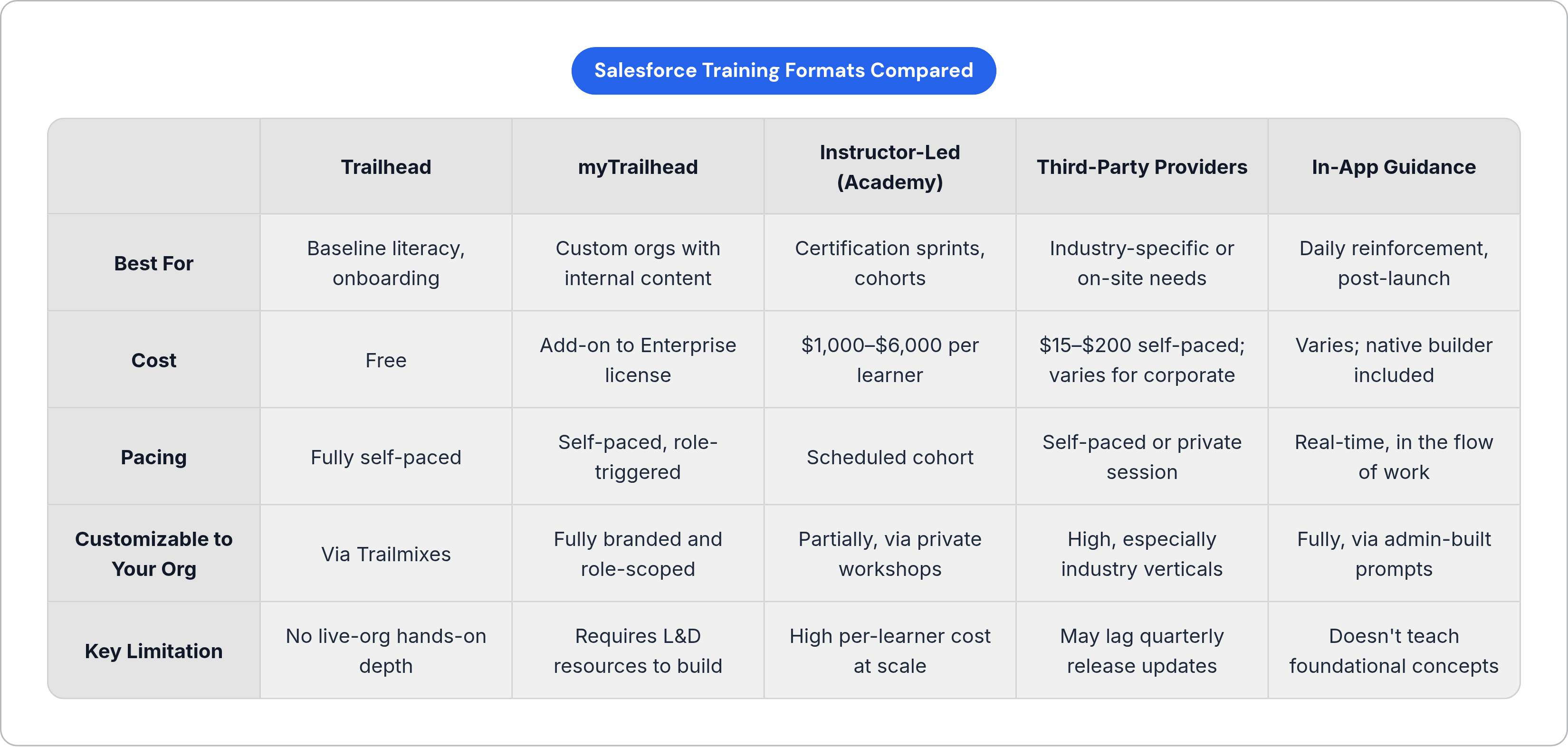
No team should rely on a single format. The question is which combination fits the team's composition, role breakdown, and timeline.
A practical layering model:
Pre-launch:
- Trailhead Trailmixes scoped to each role. Sales reps get a sales-specific path. Admins get an admin-specific path. No one is sitting through content that doesn't apply to them.
- For customized orgs, start building myTrailhead content during implementation so it's ready at go-live.
At launch:
- Instructor-led or virtual training through Trailhead Academy or a corporate provider for power users, admins, and any team members on a certification track.
- In-app guidance active from day one so reps aren't relying on memory alone from week two onward.
Ongoing:
- Trailhead for quarterly release updates. Salesforce does the work of keeping the content current. Use it.
- In-app guidance updated after each release to reflect changes in the org.
- Certification goals as 6–12 month anchors for admins and role leads. Not annual training. Actual scheduled exams with preparation support.
For large teams with diverse roles:
- Combine self-paced Trailhead (broad population, low cost) with instructor-led options (small cohorts, high stakes) and in-app guidance (everyone, all the time).
- Use third-party providers when you need industry-specific content or on-site delivery at scale.
The 90–95% adoption ceiling is real. Teams that hit it don't do it with one format or one training event. They do it by treating training as a continuous system, not a go-live task. The formats exist. The path is clear. The only variable is whether the organization treats training as overhead or as infrastructure.
It's infrastructure.