CRM Software Examples by Business Type
Choose your CRM based on business model and deal complexity, not feature count alone.
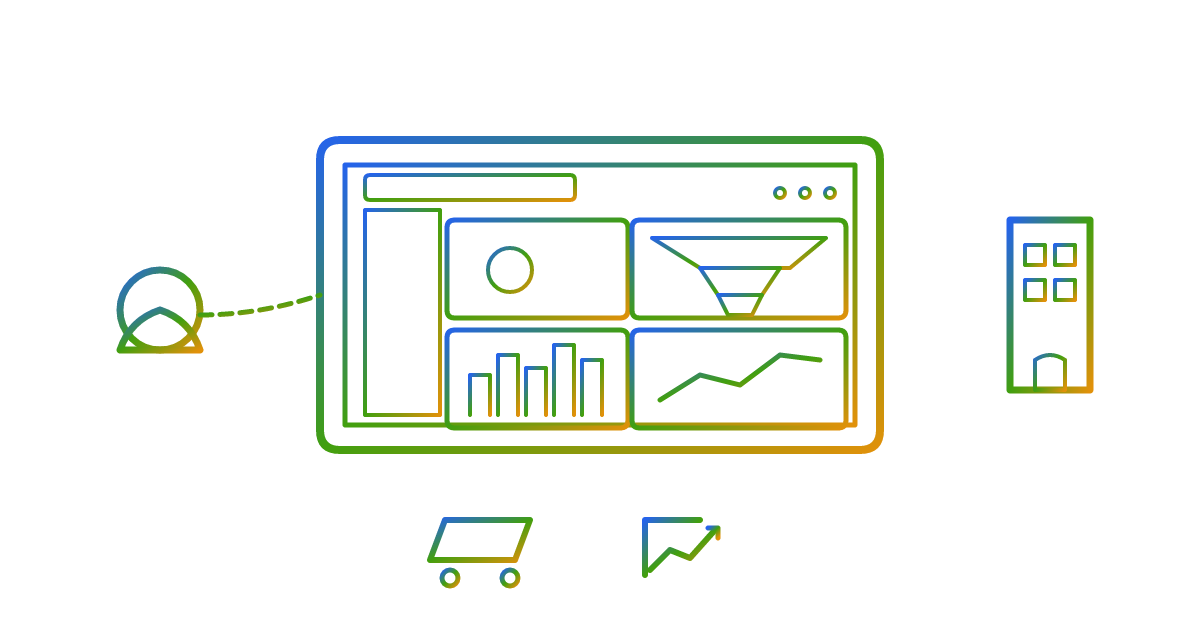
B2B relationship management is not about volume. It's about depth. You're managing a small number of high-value accounts, each with multiple contacts, multiple decision-makers, and a sales process that can take anywhere from six months to a year and a half to close. That's a fundamentally different problem than tracking thousands of individual buyers who make up their minds in minutes.
That distinction changes what the CRM has to do at a structural level. Not just in terms of features. In terms of how the whole data model is built.
Account hierarchy is the big one. The CRM needs to model a parent company, its subsidiaries, and the individual contacts within each. If that structure isn't baked in from day one, you start building workarounds. And those workarounds don't stay small. They compound quietly until someone's pulling export reports into a spreadsheet every Monday morning just to get a coherent picture of an account they've been working for eight months.
Then there's pipeline logic. B2B deals don't move from "lead" to "closed" in two steps. There are discovery calls, proposals, legal reviews, procurement cycles, and sometimes a six-month silence where nothing visibly moves and you're genuinely unsure if the deal is alive. A good B2B CRM reflects that reality instead of flattening it into a progress bar.
Integration demands are also higher than most teams expect. The CRM needs to talk to the ERP, the billing system, the marketing automation tool, the support platform. Those connectors break. APIs get deprecated. Maintaining them is a real operational cost that compounds quietly as your vendor count grows.
Reporting matters too, but not in the obvious way. Knowing how many deals are open tells you almost nothing. Knowing where they're stalling, specifically, is where the actual insight lives.
Gartner projects that by the end of 2025, the vast majority of B2B sales interactions between suppliers and buyers will happen in digital channels. CRM is the operational backbone for that shift. On pricing: enterprise B2B CRM typically runs above $150 per user per month. Mid-market options land in the $60 to $100 range. Small B2B teams can find solid options in the $10 to $50 range. Buy for the complexity you actually have, not the complexity you're hoping to grow into eventually.
Salesforce and Microsoft Dynamics for large B2B and enterprise teams
Salesforce holds roughly 21% of global CRM market share. About 90% of Fortune 500 companies are customers. At that scale, choosing Salesforce is institutionally safe. That doesn't automatically make it the right call for every team, but let's be honest about what it does deliver.
Einstein AI for forecasting and email automation. AppExchange with over 7,000 pre-built integrations. Essentially no ceiling on complexity. Large B2B teams rarely outgrow it, and that's a real thing.
But Salesforce is heavy. Setup, ongoing admin support, and proper training are the cost of admission, not optional extras. Smaller B2B teams end up paying for capability they never actually touch. That's a context mismatch, not Salesforce's fault. The platform was built for a specific kind of scale, and deploying it below that scale is roughly like renting a semi-truck to move a studio apartment — technically works, definitely not the move.
Microsoft Dynamics 365 gets less airtime in CRM comparisons than it deserves. It's not a single product. It's a suite: Sales, Customer Service, Commerce, and others. Its real advantage is tight integration with Microsoft 365, Power Platform, and Azure. For organizations already running on Microsoft infrastructure, the switching cost of going elsewhere is genuinely high, and not just financially. Dynamics 365 revenue grew 23% in fiscal year 2025's fourth quarter. That's not a platform losing momentum.
SAP and Oracle serve a narrower slice: situations where CRM has to live inside a larger ERP environment. They make sense in that context. Outside of it, they're usually more than any B2B team needs.
So the way to think about it:
- Salesforce for B2B teams that need maximum ecosystem breadth
- Dynamics 365 for organizations already deep in the Microsoft stack
- SAP or Oracle only when CRM has to be embedded in existing enterprise infrastructure
How B2C CRM differs in structure, and which platforms are built for it
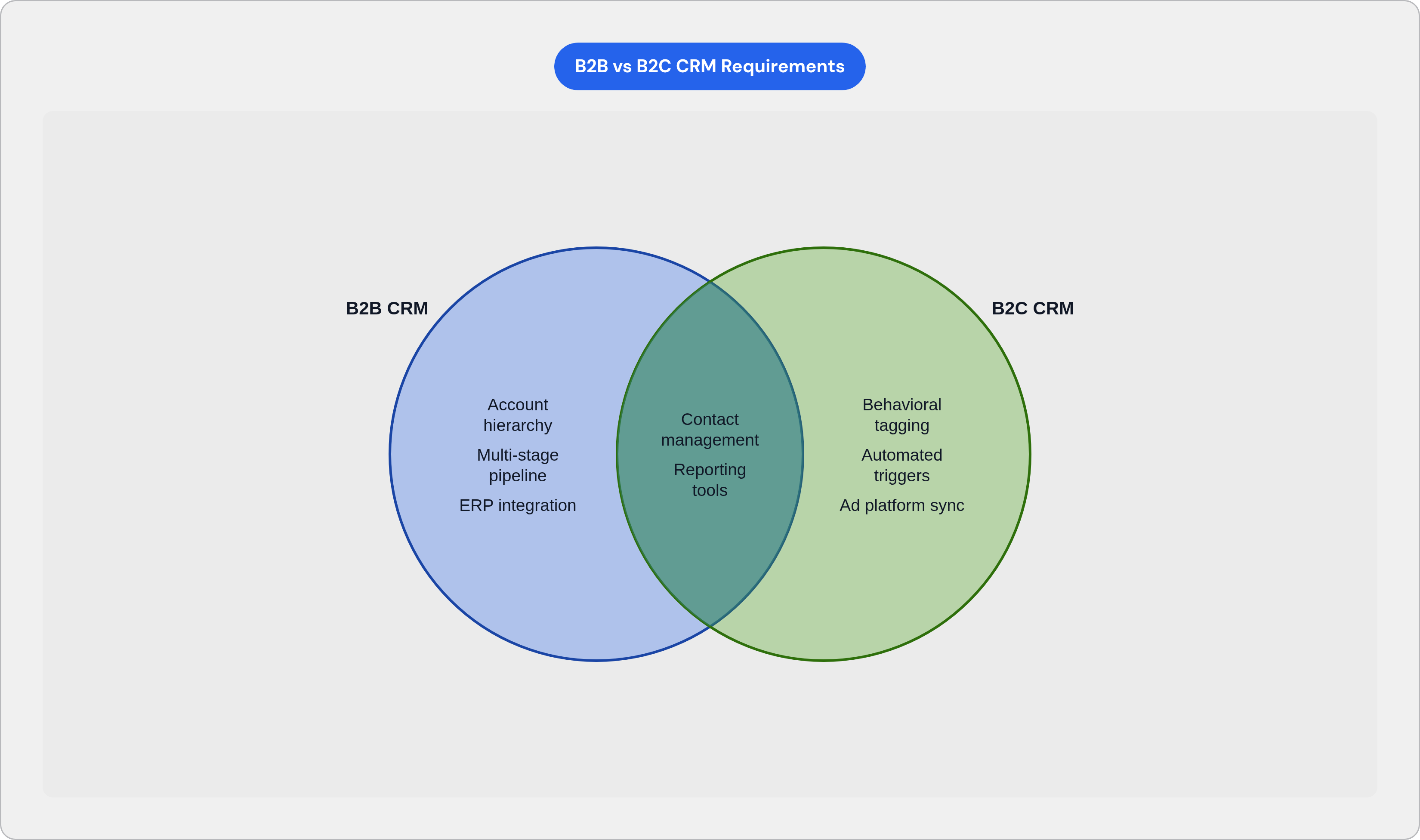
B2C is a volume game. You're not tracking twelve accounts with forty contacts each. You're tracking thousands of individual customers, managing fast purchase decisions, and running marketing touchpoints that outnumber actual sales conversations by a wide margin.
The structural requirements are nearly the opposite of B2B. No account hierarchy. No multi-stage pipeline logic for a deal that takes nine months to close. What you actually need looks like this:
- Large contact databases with fast search, clean segmentation, and behavioral tagging
- Tight integration with email, e-commerce, and ad platforms, because that's where B2C customers actually live
- Automated follow-up based on behavior, not sales rep actions. Nobody is manually following up with ten thousand customers. Triggers do that work.
- Customer lifetime value and retention signals instead of pipeline stages
HubSpot is the most common entry point for mid-market B2C companies. Its marketing automation, email scheduling, and contact management are built for high-volume customer relationships. The free tier removes the cost barrier entirely for teams still figuring out their model, which is genuinely useful when you're unsure what you need yet.
Zoho CRM is strong at scale. It connects with over a thousand third-party platforms, and a large portion of its user base is small businesses with fewer than fifty employees. The pricing is honest about what each tier unlocks: Standard at $20 per user per month covers the basics, Professional at $35 adds automation and AI assistance, Enterprise at $50 opens up deeper analytics. Each step up is a capability upgrade, not just a price bump.
Here's the mismatch problem, because it happens constantly and is worth saying plainly. A B2C team that buys Salesforce is paying for account management infrastructure they will never use. A B2B team that buys a marketing-first CRM loses pipeline visibility entirely. These aren't edge cases or mistakes that only careless teams make. They happen all the time, usually because someone evaluated the feature list instead of the underlying data model.
What small businesses and startups actually need from a CRM at early stages
Here's the trap small teams fall into: they evaluate CRMs the same way enterprise teams do. Feature lists, integration counts, scalability ceilings. None of that matters if the platform takes three months to configure and needs a dedicated admin to run. A powerful CRM that nobody actually uses is worse than a simple one that everyone does.
HubSpot's free tier is probably the most consequential entry point in this segment. Contact management, deal pipeline, call and email logs, Slack and Gmail integrations, email scheduling. All free. For a lot of early-stage companies, it covers everything needed in year one without any of the configuration overhead. HubSpot also runs a startup program with significant discounts from pre-seed through Series A for verified companies, with pricing that steps down over the first few years. It's a real on-ramp for funded teams that want more capability without enterprise pricing.
Other options worth knowing:
- Pipedrive for sales-led startups. The pipeline-first interface is a drag-and-drop board with always-visible next actions. If your team closes deals actively and needs clarity without a learning curve, Pipedrive clicks fast.
- Copper for Google Workspace teams. It lives inside Gmail natively. No context-switching. For startups where everyone already lives in Google's ecosystem, that matters more than it sounds.
- Freshsales for SaaS and product-led startups. Combines pipeline, phone, email, and chat in one product. Free plan available, paid tiers scale with team size.
- Salesforce Starter Suite for B2B startups that expect to scale fast and want to avoid a platform migration later. Lower-cost entry into the Salesforce ecosystem, with complexity that grows alongside the team.
Prioritize time-to-value and setup simplicity first. Only pay for integration depth and reporting sophistication once the sales process is actually defined. You can't optimize a process you haven't built yet. Trying to is how you end up spending three months configuring a CRM before you've made a single sale — and that's what you'd call putting the CRM before the horse.
Real estate CRM as a distinct category with industry-specific requirements
Real estate CRM is its own product category. A contact-centric CRM built for software sales doesn't map cleanly onto property transactions, and trying to make it work is a project with no satisfying ending.
The data model is fundamentally different. A real estate CRM has to track properties, listings, buyers, sellers, and transaction timelines, simultaneously, with those objects relating to each other inside the same system. According to the NAR's 2024 Technology Survey, CRMs ranked among the top three tech tools delivering the highest-quality leads for agents. The value isn't just pipeline tracking. It's lead quality, which in real estate is basically the whole game.
What a real estate CRM has to handle that generic CRMs simply don't:
- Lead capture from property portals like Zillow and Realtor.com, as well as social ad platforms
- Automated follow-up sequences tuned to buying and selling timelines, not generic sales cycle stages
- Property matching and listing management inside the contact record
- Email and newsletter tooling for homebuyer nurture campaigns
By use case:
- Pipedrive brings a drag-and-drop email builder for property newsletters and buyer outreach, with pipeline visualization that adapts reasonably well to transaction stages
- BoomTown is built specifically for real estate teams. Lead generation tools, Facebook and Instagram integrations, Zillow and Realtor.com connectivity built in. At $850 per month, it's aimed at teams, not individual agents.
- Wise Agent, Propertybase, and Market Leader are each purpose-built for real estate workflows at different price points and team sizes.
If a CRM requires workarounds to associate a contact with a property, or to trigger follow-ups based on listing activity, it's the wrong tool. Full stop. Those workarounds start small and grow steadily until they're breaking at exactly the wrong moment, like the week you're trying to close three transactions at once.
Nonprofit CRM and why donor management is not the same as customer management
Nonprofits manage relationships with donors, volunteers, grant-makers, and program beneficiaries. None of those groups fit into "lead → opportunity → closed deal" logic. Trying to force them in rarely ends well. The pattern I've seen more than once: an organization buys a commercial CRM, finds it doesn't quite fit, patches it with workarounds, and eventually runs the actual operation out of spreadsheets sitting right next to the CRM they're paying for every month.
What nonprofit CRM needs that commercial CRM doesn't provide out of the box:
- Donation tracking and gift history by donor
- Campaign and appeal management tied to fundraising cycles
- Grant tracking with deadlines and reporting requirements
- Volunteer coordination and event management
- Soft credit and matching gift processing
These aren't nice-to-haves. They're the operational core.
The platforms built for it:
- Salesforce Nonprofit Success Pack (NPSP) extends the Salesforce platform with nonprofit-specific data models. Widely adopted by mid-to-large nonprofits that need scalability and can staff the admin overhead. The learning curve still applies. That's just the Salesforce reality, nonprofit version included.
- Bloomerang is designed specifically for donor retention. It has a built-in donor retention rate dashboard, which is a meaningful differentiator for organizations focused on recurring giving.
- DonorPerfect is a long-standing nonprofit-specific platform with strong reporting for grant compliance and major gifts.
- NeonCRM combines donor management, membership, event registration, and online fundraising in one platform. A common choice for membership-based nonprofits.
Finance, insurance, and professional services are the top CRM-spending industries overall. Nonprofits are on the opposite end of that budget spectrum. That makes right-sizing the platform more consequential, not less. Overpaying for unused commercial CRM features is a real cost for organizations running on restricted budgets. The wrong platform isn't just annoying. It's a resource problem.
How to use business type as the first filter, and what to evaluate after that
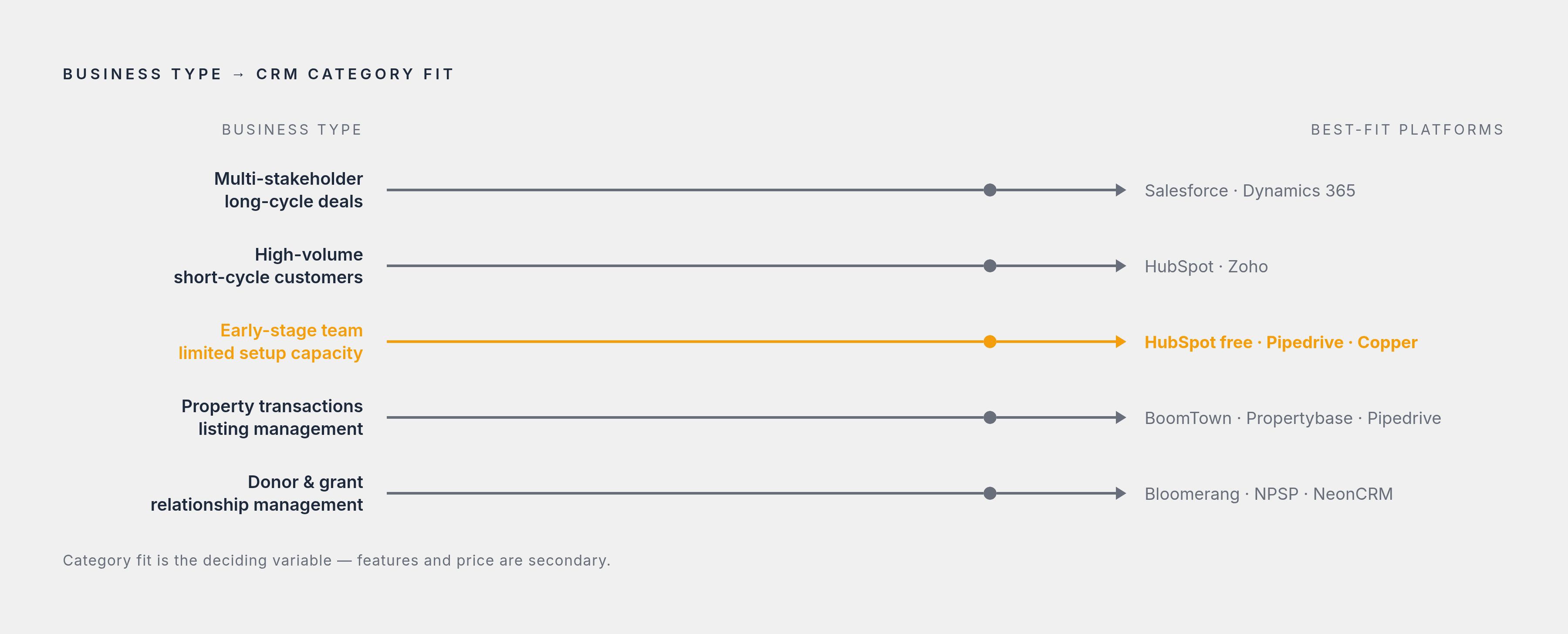
Start with your business model and relationship type. Not the feature list. Not the pricing page. Definitely not what the biggest company in your industry uses, because their context is not your context.
The first cut:
- Multi-stakeholder, long-cycle deal management → B2B-oriented platform (Salesforce, Dynamics 365)
- High-volume, short-cycle individual customers → marketing-integrated CRM (HubSpot, Zoho)
- Early-stage team with limited setup capacity → simplicity-first, low-cost entry (HubSpot free, Pipedrive, Copper)
- Property transactions and listing management → real estate-specific CRM (BoomTown, Propertybase, Pipedrive)
- Donor and grant relationship management → nonprofit-specific platform (Bloomerang, NPSP, NeonCRM)
Once business type narrows the field, the next layer is practical.
Your existing tech stack matters more than most people admit. Does the CRM integrate natively with tools already in use, or does it require custom connector work? Custom connectors break. Budget for maintenance upfront or it will catch you off guard later, usually during a product launch or a hiring push when you have the least bandwidth for it.
Team size and admin capacity matter too. Salesforce returns full value with dedicated admin support. Smaller teams should weight setup simplicity heavily, even if that means accepting a lower feature ceiling. A feature ceiling is irrelevant if nobody has bandwidth to learn the platform in the first place.
Growth trajectory is the one that trips people up most. A startup that will be at enterprise scale in two years should think about platform ceiling. One that won't should think about current usability. Those are genuinely different decisions. Conflating them leads to either overbuilding (expensive, complicated, demoralizing) or underbuilding (requires a migration at the worst possible time).
The global CRM market is large and still growing fast. More growth means more options, more vendors, more feature parity, and substantially more noise. It does not make the choice simpler. It makes it harder, because the number of defensible-looking wrong answers keeps going up.
The right CRM is the one whose default data model most closely matches how the business actually manages relationships. Category fit is the thing. Get that right first, and even a modest implementation does most of the heavy lifting. Get it wrong, and no amount of configuration pulls it back.