Sales Tools Software Evaluation Criteria
How to buy sales software without wasting money on tools your team won't actually use.
Sales software buying is broken, and the fix isn't a better feature checklist. It's a framework that weighs adoption and total cost as heavily as capability, applied in the order real teams actually make decisions: category fit first, features second, integration third, then AI claims, data quality, usability, and finally the real cost of owning the thing. The market is big and getting bigger, which means vendors have every reason to market hard and blur the lines between products that actually do different jobs.
CRM software alone grew from $40.29 billion in 2024 to $44 billion in 2025, according to Research and Markets. The wider sales tech category is on track to hit $192.71 billion by 2034, growing at a 16.3% compound annual rate, pushed along by AI features showing up in basically every subcategory now. G2's most recent Best Sales Software list turned over 60%, meaning 30 of the 50 winners were brand new names. Last year's shortlist is already stale. Buyers are stuck picking through a crowded, fast-moving market with aggressive sales pitches and pressure from leadership to "modernize," and without some kind of structure, the decision just defaults to whichever demo looked cool and whichever vendor blinked first on price.
The shelfware pattern that undermines most purchasing decisions
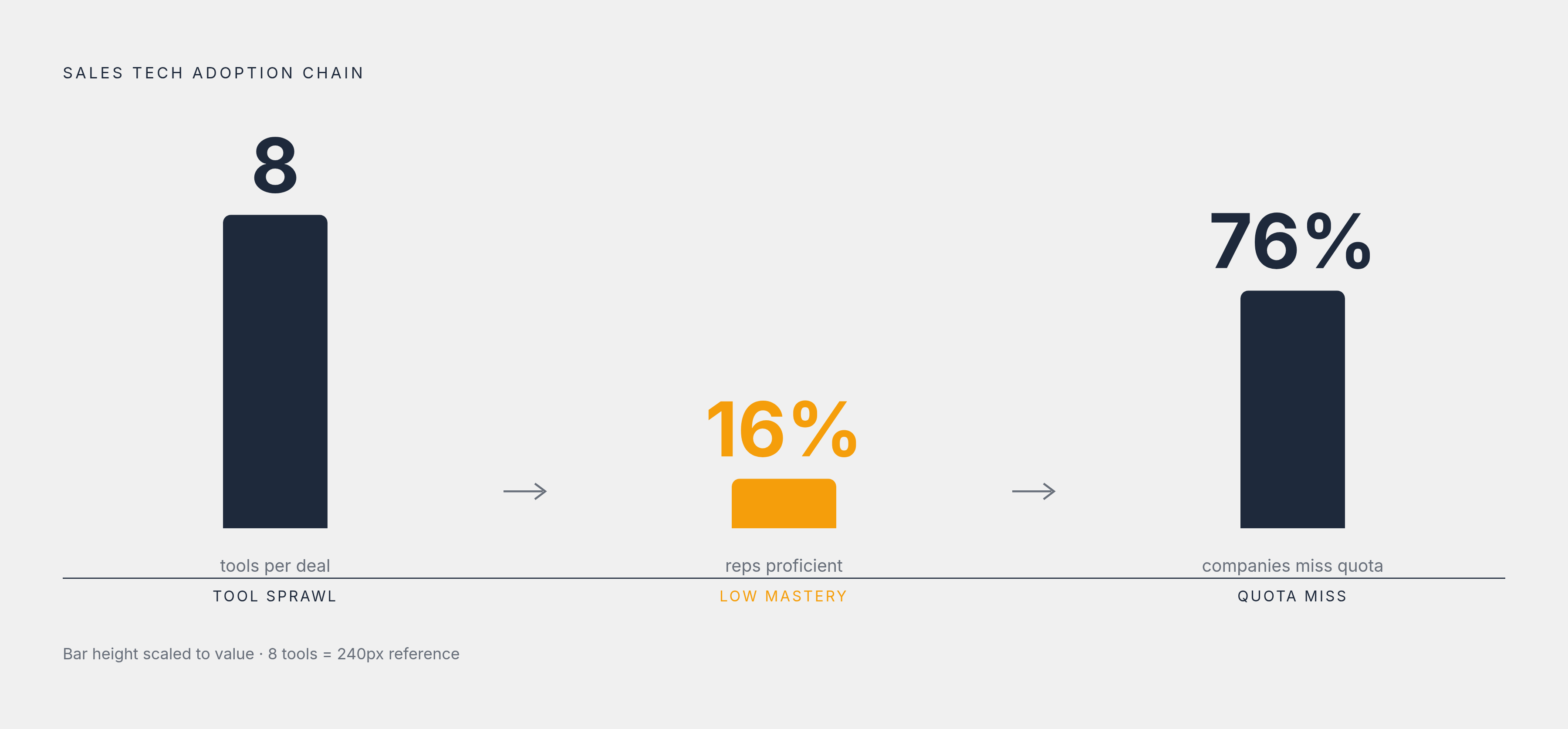
Here's the joke nobody's laughing at: sellers now juggle an average of 8 tools just to close one deal. Gartner's 2025 Sales Survey found 42% of reps feel buried under too many tools, and the overwhelmed ones are 45% less likely to hit quota. So the tool meant to help them sell faster is, functionally, doing the opposite.
It gets worse. Objective Management Group's 2025 internal data shows sales tech proficiency sitting at just 16% of salespeople, even as stacks keep growing. Tools are piling up faster than anyone's learning to use them. That's not an adoption problem so much as a math problem: more software, less mastery, same quota.
Poor adoption gets blamed for missed quota at 76% of companies. But blaming "resistance" misses the point. Reps don't resist tools out of laziness. They resist tools that hand them bad data, waste their afternoon, and then get blamed when the pipeline looks thin. Trust erodes fast once that pattern sets in, and it doesn't come back with a firmer email from IT.
The receipts: a 2025 benchmark of 938 B2B companies put the average stack at 8.3 tools, running $187 per rep per month, with 73% of teams admitting to overlap that wastes $2,340 per rep every year. Other estimates put the real number closer to 13 tools per team, and 86% of reps can't say which tool they're supposed to use for which task. That's not a tech stack. That's a junk drawer with a login screen.
So the evaluation instinct needs to flip. Stop asking "what can this tool do" and start asking "will anyone actually use this six months from now, and is it worth what we're paying for it." Feature breadth that wows in a demo often just becomes more weight for reps to carry.
Mapping the sales software landscape before scoring any vendor
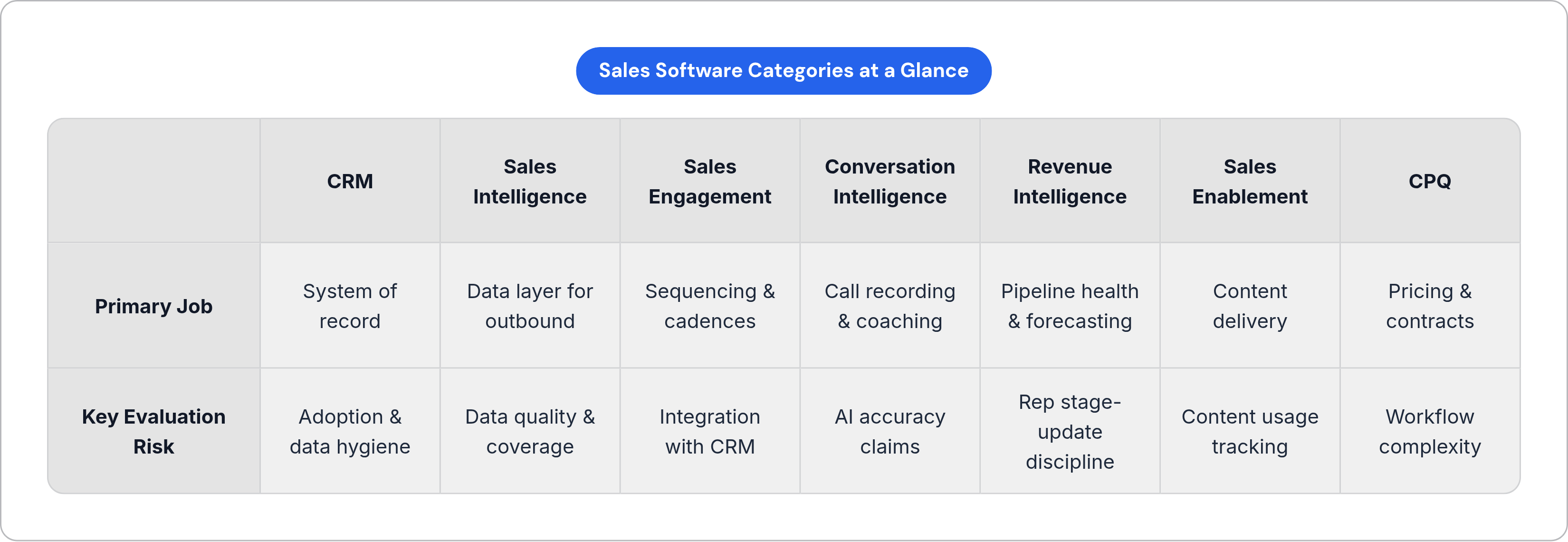
Before scoring a single vendor, know what category you're even shopping in. Seven show up again and again:
CRM sits at the center as the system of record, holding 40.22% of sales software revenue in 2025, still the biggest single slice of the pie. Around it sit sales intelligence and prospecting tools (the data layer feeding your outbound), sales engagement platforms (sequencing and multi-channel cadences), conversation intelligence (call recording, transcripts, coaching), revenue intelligence (pipeline health and forecasting), sales enablement content tools, and CPQ platforms for pricing and contracts.
Mixing these up during evaluation is how teams end up buying the wrong thing. A conversation intelligence tool shouldn't get graded on the same checklist as a CRM; they're not doing the same job, and holding them to the same standard is like judging a wrench by how well it hammers nails. Forrester's Q1 2026 look at Revenue Enablement Platforms judges the top players on three things: how well they equip sellers, how fast they get reps ready to sell, and whether they deliver one unified view of what's happening. Just hosting content and calling it "enablement" doesn't cut it anymore.
One more shift worth naming: cloud deployment now owns 71.95% of market revenue and is growing at 18.78% a year. On-premise isn't really a live option for most mid-market teams anymore; it's the software equivalent of asking for a flip phone. Before you build a scorecard, figure out what gap you're actually filling. Not which vendor gave the smoothest demo.
Functional fit: what the tool must do versus what it claims to do
Here's the real question buried under every glossy pitch deck: does this tool cover what your team needs to do their job, and are the features you actually want included in the price you're being quoted, or locked behind an upsell you'll discover in month four?
Before you take a single demo call, sit down and list must-have features by role, separately for AEs, SDRs, managers, and RevOps. Their needs don't overlap as much as vendors like to pretend. And watch closely during demos for the difference between what's live today and what's "coming soon." Vendors demo roadmap items constantly as if they already ship, and by the time you notice the gap, you've already signed.
Rate must-haves and nice-to-haves on separate scales. A tool that nails the essentials but skips the extras will beat a flashy tool that nails the extras and fumbles the basics, every time, in the field.
Underneath all of this sits a data problem that no feature list can paper over. A sequencing tool is only as good as the email and phone data behind the contacts you load into it. A forecast roll-up means nothing if reps aren't actually updating deal stages. So the best test isn't the vendor's polished sandbox. Ask for a trial against your own data, your own contacts, your own mess. The gap between how a tool performs on your data versus their curated demo is where feature claims go to die.
Integration fit and the cost of another data silo
EY research puts revenue leakage from disconnected systems at 1% to 5% of realized EBITA every year. That's not a hypothetical risk sitting in a slide deck somewhere; that's money quietly leaving the building because two tools don't talk to each other.
Your CRM is the anchor. Everything else in the stack needs to read from it and write back to it, in both directions, in real time. A native integration beats a CSV export the way a phone call beats a message in a bottle: one updates records automatically and triggers workflows, the other requires someone to manually babysit a spreadsheet.
DATAVERSITY's 2024 Trends in Data Management survey found 68% of respondents naming data silos as their top concern, up 7 points from the year before. Stacks are growing, and the silo problem is growing right alongside them, not shrinking. Highspot's State of Sales Enablement Report 2025 found companies with integrated tools are 42% more likely to see a real bump in rep productivity than companies running disconnected systems.
So when you're evaluating integrations, ask the annoying, specific questions. Is the CRM connector actually certified and maintained by the vendor, or is it a Zapier workaround someone built for a customer once and forgot about? Does data flow both directions, or just out? What's the sync frequency, real-time, hourly, daily, and does that match how fast your team actually moves? Is there a documented API for custom connections? And when two systems disagree about a record, what happens: overwrite, merge, or flag for a human?
If a vendor's answer to "how do you integrate" is "export to CSV and re-import," walk away. That's not a stack-compatible tool. That's a data island, and someone on your team is going to spend their Friday afternoons manually reconciling it forever.
Evaluating AI features without being misled by the marketing
Everyone has AI now. SalesPlay by MarketsandMarkets found 78% of sales tech vendors planning major generative AI releases in 2025 and 2026, which means "we have AI" has stopped meaning anything as a differentiator. It's like a restaurant bragging about having silverware.
Gartner predicts 40% of enterprise applications will run task-specific AI agents by the end of 2026, up from under 5% in 2025. That's a fast climb, and it changes the question you should be asking. Not "does it have AI" but "what kind, and who's watching it."
There's a real difference between generative and agentic AI, and it matters for how much rope you give the tool. Generative AI drafts an email, summarizes a call, suggests a next step. A human has to ask for it. Agentic AI acts on its own: it books the meeting, updates the record, kicks off the sequence, no prompt required. These need different levels of trust and completely different oversight.
G2's 2025 AI Agents Insights Report frames the evaluation around four things. First, trust and data security: how is the vendor handling the sensitive prospect and deal data you're feeding into their model? Second, connected architecture: does the AI work across your whole stack, or only inside the vendor's own walled garden? Third, pricing: is AI billed per seat, per usage, or bundled in, and does that scale in a way you can actually predict? Fourth, and most important, proof: can the vendor show real outcome data, not just a features list? That same G2 report found a median 23% gain in speed-to-market from deployed AI agents, with sales use cases reaching as high as 50% velocity gains. Ask which of their customers actually saw that, and under what conditions, because "up to 50%" is doing a lot of quiet lifting in that sentence.
Ask for model transparency too: what model powers the feature, what data trained it, how often it gets retrained, and what their accuracy claims are actually based on. The AI-in-CRM market alone sits at $11.04 billion in 2025 and is projected to reach $48.4 billion by 2033, and businesses using AI well inside their CRM are 83% more likely to beat their sales goals. Notice the word "well." That number describes AI implemented with care, not AI as a checkbox on a pricing page.
Data quality as the hidden determinant of whether any tool works
Here's the pattern that kills more sales tools than bad UI ever will: a rep pulls 200 fresh prospects from a shiny new data tool, loads them into a sequence, and half of them bounce. That rep doesn't file a support ticket. They just quietly stop using the tool and never mention it again. Data quality breaks trust, broken trust kills adoption, and that cycle is the single most predictable failure pattern in sales tech.
For any prospecting or intelligence tool, check the plumbing before you check the interface. What percentage of records actually produce a clean send instead of a bounce? How recently were the direct-dial numbers verified, and how? How fast does the platform catch a job change, a funding round, or a headcount shift? And does its coverage actually match your market, because a tool with deep US enterprise data might be running on fumes in EMEA or SMB.
For CRM and engagement tools, the question shifts to hygiene: duplicate detection, field validation, and how the system handles conflicting data from different sources. Before signing anything, pull a sample, 100 to 200 records that match your ideal customer profile, and check it yourself. Bounce rate and title accuracy on that sample will tell you more than any demo ever could.
And forecasting tools face their own version of this problem. A revenue intelligence platform is only as smart as the deal stages your reps bother to update. That's not really a vendor problem. That's a people problem wearing a vendor's logo.
Usability and the conditions under which reps actually adopt a tool
If a tool asks reps to leave the app they already live in, only the true believers will keep using it, and everyone else quietly drifts back to their old habits. The tools winning adoption in 2026 live inside places teams already spend their day: Salesforce, Slack, Google Workspace, Microsoft 365, plain email.
Three things have to be true at once, or adoption falls apart. It needs to feel simple for the rep, meaning few clicks, no jumping between five tabs, and a payoff that shows up fast and obviously. It needs to be smart under the hood, doing the heavy lifting of automation and enrichment quietly in the background. And it needs to stay transparent for managers and customers, with clear audit trails and explainable outputs, especially anywhere a black-box recommendation could cost someone a deal.
During any trial, watch three things closely. How long does a brand-new rep take to finish a real task, not a guided tour with training wheels on? Does the interface change based on whether you're an AE, an SDR, or a manager, or does everyone stare at the same generic dashboard? And does the tool require a formal training session to use, or can someone figure it out mid-workflow, the way you'd figure out a new phone?
Highspot's 2025 research points to a handful of things that actually move adoption: building the tool into the daily workflow instead of bolting it on, offering learning paths specific to each role, showing reps time saved instead of just features used, and getting managers to model the behavior you want to see. That last one matters more than people give it credit for. If a manager never opens the tool, the team notices, and adoption follows their lead straight down. Ask whether the tool gives managers a reason to log in daily, not just a report they glance at once a quarter.
Pricing models and what total cost of ownership actually includes
Three pricing structures dominate the market right now. Per-seat subscriptions run CRM, sales engagement, and coaching tools; the cost climbs in a straight line with headcount, which is predictable but gets expensive fast as the team grows. Quote-based enterprise bundles dominate sales intelligence, conversation intelligence, and revenue intelligence, and the list price is basically a suggestion, not the number you'll actually pay. Consumption-based and hybrid pricing is showing up more in AI-native tools, billed by API call, token, or outcome instead of seat count; harder to forecast, but it can work out better for teams with volume that swings up and down.
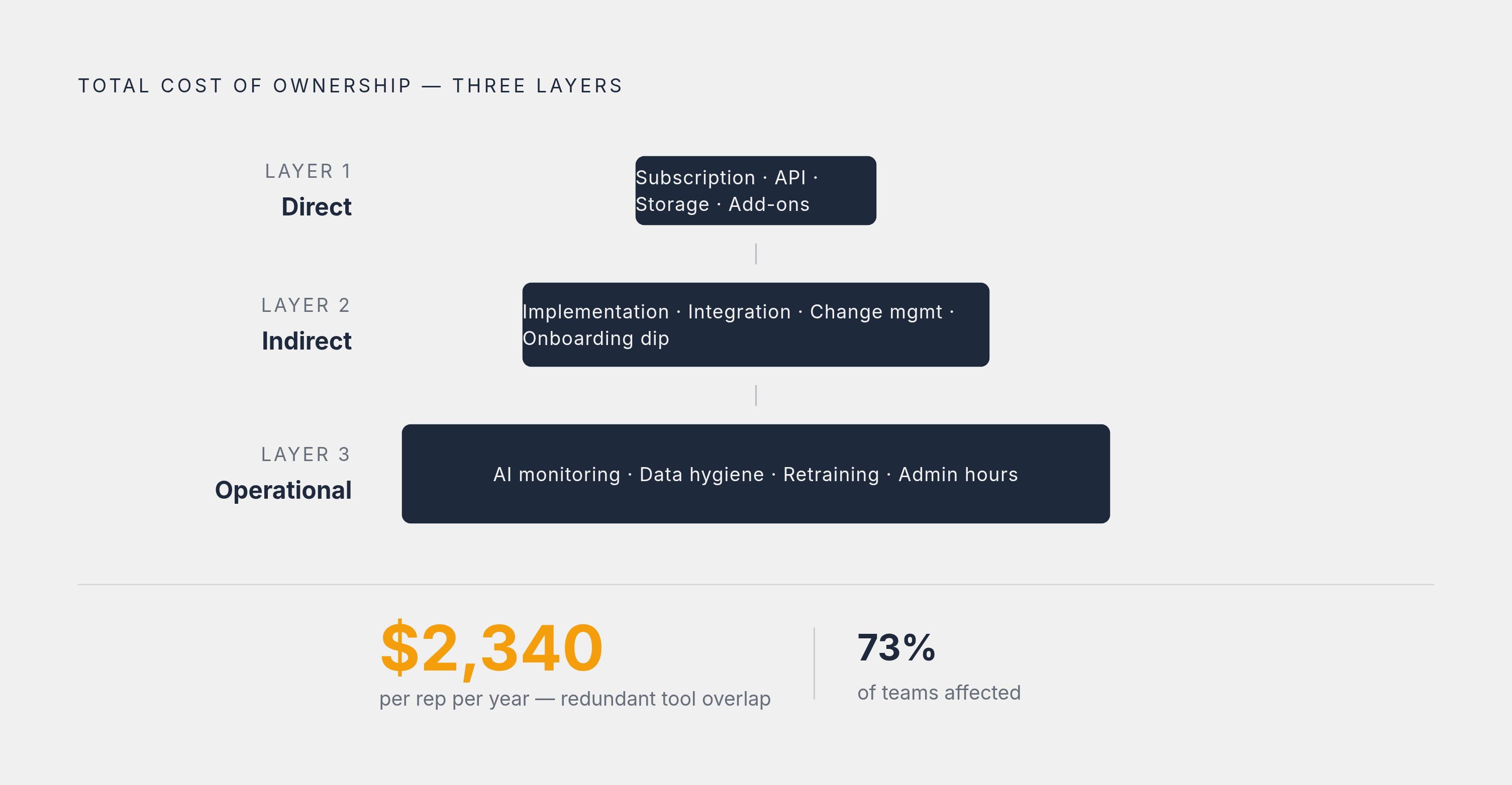
Total cost of ownership runs three layers deep, and most buyers only count the top one. Direct costs are the obvious stuff: subscription fees, API usage, storage, add-on modules. Indirect costs hide underneath: implementation time, integration engineering, change management, and the productivity dip that happens while everyone learns the new system instead of selling. Then there's ongoing operational cost, the quiet stuff that never shows up on the invoice: monitoring AI features for accuracy, keeping data clean, retraining models, and the internal hours it takes to keep any of this running at full strength.
And the overlap cost is real money, not a rounding error. Remember that 938-company benchmark: 73% of teams found real overlap between tools in their stack, wasting over two grand per rep per year. That's not a pricing problem you solve by negotiating harder. That's a stack problem you solve by asking, before you buy anything new, whether you already own something that does this job halfway decently. Sometimes the best purchasing decision is the one you don't make.